AKNES 8BitDo Ultimate 2C Wireless 2.4G Controller for Windows PC & Android



AKNES 8BitDo Ultimate 2C Wireless 2.4G Controller for Windows PC & Android
The AKNES 8BitDo Ultimate 2C Wireless 2.4G Controller is a gamepad built around a specific idea: give PC and Android players a flexible, low-latency input device without forcing them into a complicated setup routine. It combines Hall effect joysticks, a high polling rate, and on-the-fly button remapping into a single package that ships with everything needed to get started. This review walks through what the controller offers based on the manufacturer’s stated specifications, and where it makes the most sense for different types of players.
Design & Build Quality
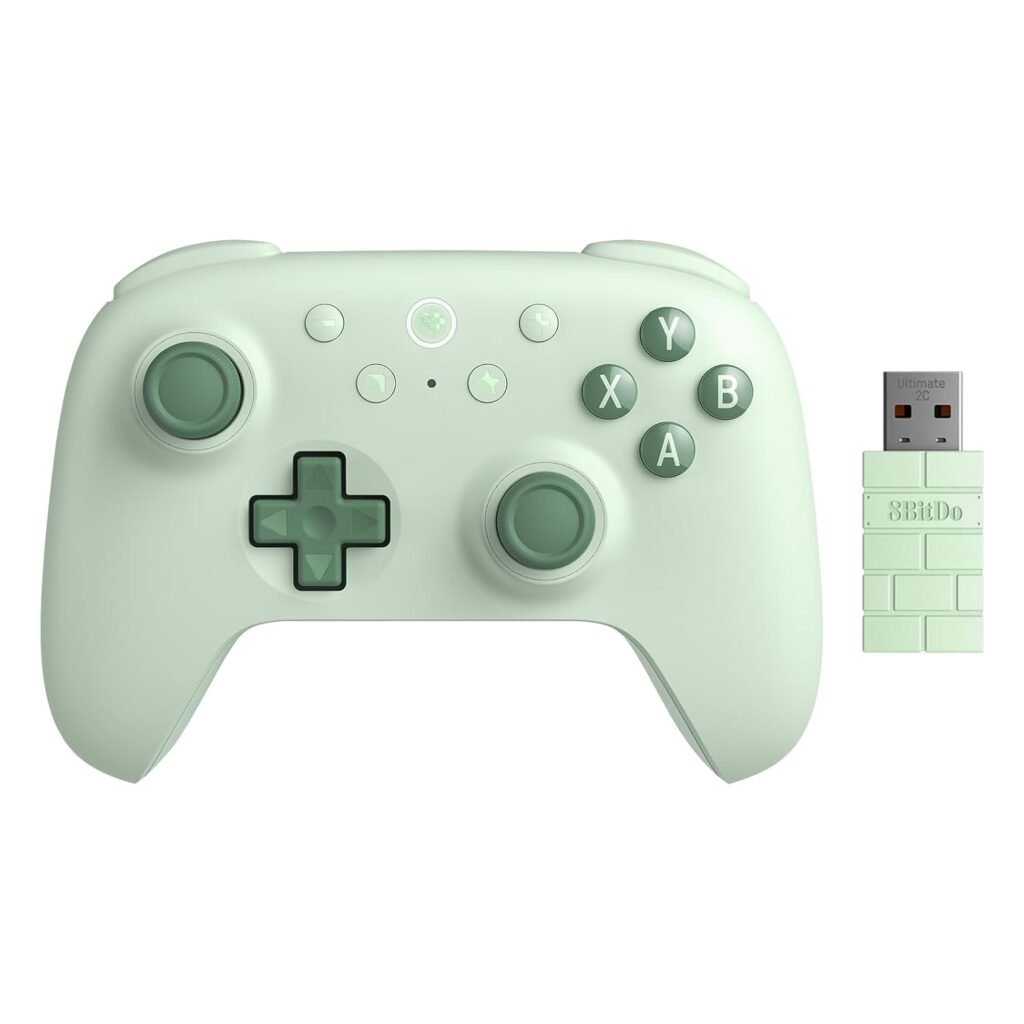
The controller carries the familiar 8BitDo design language, with a layout that includes the standard face buttons, a D-pad, dual analog sticks, and shoulder inputs. What stands out in the supplied information is the inclusion of wear-resistant metal joystick rings. These rings surround the joystick mechanism and are described as contributing to the overall precision and sensitivity of the sticks. The use of metal here is a stated design detail rather than a claim about long-term durability, but it does signal that the joystick area has been given specific attention.
The controller also features what the manufacturer calls “refined bumpers and D-pad,” along with refined vibration delivered through a rotor motor. The bumpers are not just the standard shoulder buttons — the controller includes additional R4 and L4 buttons, sometimes described as fast bumpers, which can be configured for extra inputs. The overall shape and button arrangement follow a conventional gamepad layout, so anyone familiar with modern controllers should find the transition straightforward.
In the box, buyers receive the controller itself, a 2.4G adapter, a one-meter cable, and a manual. The inclusion of the adapter is important because it means the wireless connection method is ready to use out of the box, without a separate dongle purchase. The one-meter cable is on the shorter side, which is worth noting for anyone planning to use the controller in wired mode at a distance from their PC.
Features & Technology
The headline feature here is the pair of Hall effect joysticks. According to the supplied information, these are GuliKit Hall effect joysticks. Hall effect technology is notable because it replaces the physical contact-based sensing found in traditional analog sticks with a magnetic sensing approach. The manufacturer states that the Hall effect joysticks and triggers, combined with the metal joystick rings, provide precision and sensitivity. That is a stated product claim, and it is the kind of feature that tends to appeal to players who are conscious of stick performance over time.
Polling rate is another area where the Ultimate 2C makes a clear specification statement. The controller is rated at 1000Hz polling on both the 2.4G wireless connection and the wired connection. In practical terms, a higher polling rate means the controller reports its state to the PC more frequently, which is intended to support precise, low-latency performance. The manufacturer explicitly links the 1000Hz figure to low-latency performance, so that is the framing to keep in mind.
Customization is handled in two notable ways. First, the R4 and L4 buttons can be remapped without any software. The procedure is straightforward: hold the L4 or R4 button together with the button you want to assign, then press the Mapping button to complete the configuration. Repeating the same procedure cancels the mapping. This means players can adjust their extra inputs mid-session without opening a configuration app.
Second, the controller supports firmware updates through the 8BitDo Ultimate Software V2, available at the manufacturer’s software page. There is also a built-in no-deadzone mode. With the controller turned on, pressing “plus + minus” for five seconds toggles the mode: two vibrations indicate no-deadzone mode, and one vibration indicates deadzone mode. This gives players a quick way to switch between the two behaviors directly on the hardware.
The turbo function is available on the D-pad, View, Menu, and Home buttons. It is worth noting that these same buttons — D-pad, View, Menu, and Home — are not supported for the custom mapping feature. That distinction matters if you are planning a specific remap layout.
Performance & Everyday Experience
Because the controller supports 2.4G wireless, wired, and Bluetooth connections depending on the platform, the everyday experience varies by device. On Windows, the 2.4G adapter and the wired connection are both available, and both are rated at the 1000Hz polling rate. That gives PC players a choice between a wireless setup with the included adapter or a direct wired connection, with the same stated polling performance in either case.
On Android, the connection method is Bluetooth. The controller is listed as compatible with Android 9.0 and above, and Windows 10 (1903) and above. These are the supported platforms, and the connection method differs between them, so it is worth confirming which mode you will be using before purchase.
The vibration system uses a rotor motor, described as refined. Vibration is a standard part of modern gamepad feedback, and its inclusion here rounds out the feature set alongside the turbo function and remappable buttons. The combination of Hall effect sticks, a 1000Hz polling rate, and hardware-level remapping suggests a controller aimed at players who want control over their inputs rather than a purely plug-and-play experience.
Battery & Connectivity
The Ultimate 2C is powered by a 480mAh built-in rechargeable lithium-ion battery pack. The stated charging time is two hours. The battery is built in rather than removable, so charging is handled through the included cable. The 2.4G adapter is included for wireless use on Windows, while Android relies on Bluetooth.
It is worth being clear about the connection matrix, since it is one of the more specific aspects of this controller:
- 2.4G wireless — Windows
- Wired — Windows
- Bluetooth — Android
This means the 2.4G adapter is a Windows-focused accessory, and Android users will connect over Bluetooth instead. The controller does not list a 2.4G option for Android or a Bluetooth option for Windows in the supplied information, so buyers should match the connection method to their platform.
Who Is This Product Best For?
This controller is a natural fit for Windows PC players who want a wireless gamepad with a dedicated 2.4G adapter and the option to go wired when preferred. The 1000Hz polling rate on both 2.4G and wired connections is a relevant detail for players who care about input responsiveness in fast-paced games.
It also suits players who like to customize their controls without installing software. The hardware-level R4 and L4 remapping, the no-deadzone toggle, and the turbo function all operate on the controller itself, which keeps configuration quick and independent of a PC application.
Android users running Android 9.0 or above are also covered, provided they are comfortable connecting over Bluetooth rather than 2.4G. And for players who specifically want Hall effect joysticks, the GuliKit Hall effect sticks are a central part of the pitch here.
Final Verdict
The AKNES 8BitDo Ultimate 2C Wireless 2.4G Controller is a well-specified gamepad for Windows and Android. Its strengths, as stated by the manufacturer, are the GuliKit Hall effect joysticks, the 1000Hz polling rate on both 2.4G and wired connections, and a customization system that works without software. The inclusion of the 2.4G adapter, cable, and manual means the package is ready to use immediately.
The main considerations are the platform-specific connection methods and the built-in 480mAh battery with a two-hour charge time. Buyers who want a straightforward, customizable controller for PC gaming, or a Bluetooth option for Android, will find the feature set here aligns well with those needs. Those who require a specific connection type on a specific platform should confirm compatibility against the listed Windows 10 (1903)+ and Android 9.0+ requirements before deciding.
View on Amazon