PUBG Controller for iPad, 4 Triggers [6 Finger Operation] Sensitive Shoot Aim Trigger Gamepad Grip, Support 9.7-12.9 inch iPad & Tablet (Thickness < 10mm)



PUBG Controller for iPad: A Four-Trigger Grip for Mobile Battle Royale Players
Mobile battle royale games have a control problem that touchscreens alone cannot fully solve. Firing, aiming, and moving at the same time with just two thumbs is awkward, and long sessions can leave fingers cramped and fatigued. The PUBG Controller for iPad is a clip-on gaming grip that attempts to address this by adding physical trigger buttons to the top of a tablet, allowing players to use more fingers at once. It is a passive accessory rather than an electronic controller, and it targets a specific slice of the tablet market: slim devices measuring under 10mm thick.
This review looks at what the grip actually offers, how it is set up, which tablets it fits, and who is likely to get the most out of it.
Design and Build Quality
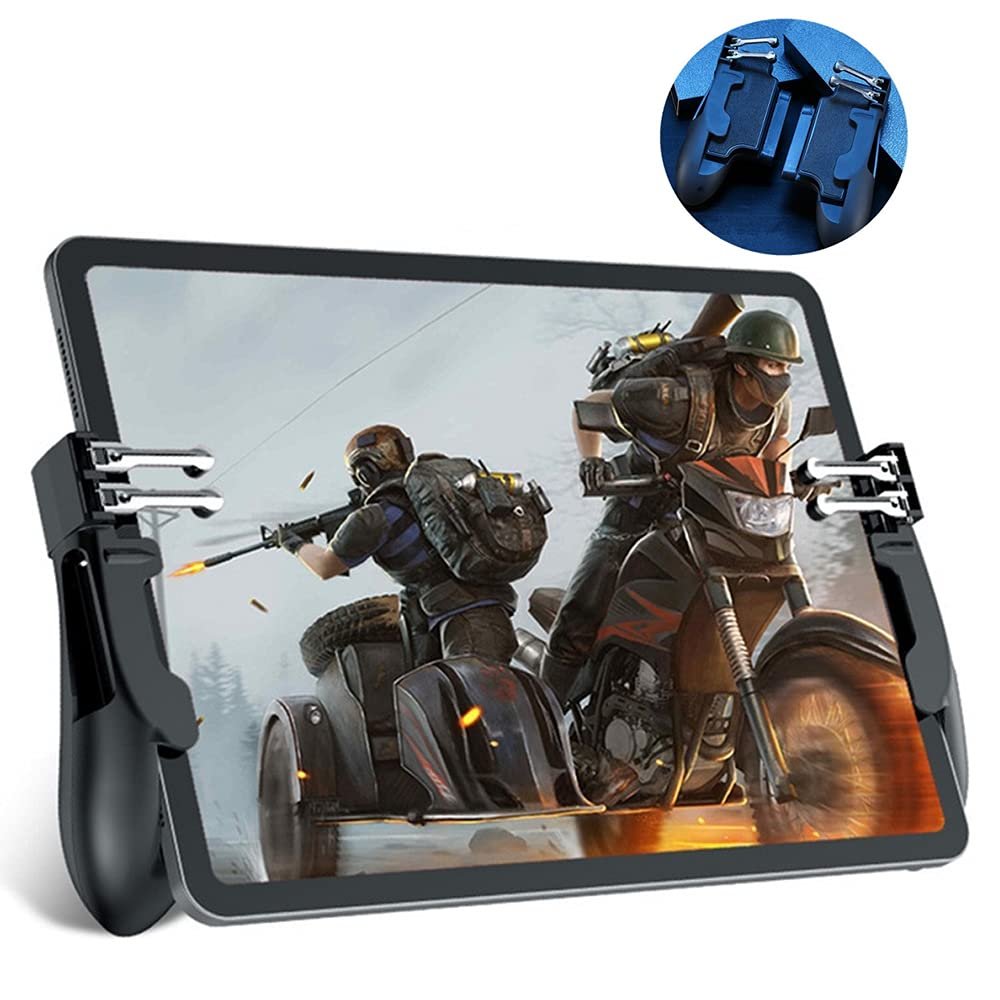
The grip combines a gamepad-style frame with an integrated ignition controller, meaning the trigger assembly and the grip itself are one piece rather than separate add-ons. The design is described as ergonomic, with the stated goal of keeping hands comfortable during extended play. The manufacturer also notes that the grip is lightweight and portable, small enough to slip into a pocket and carry to an office, school, trip, or camping session.
On the contact side, the trigger buttons use high-density conductive rubber paired with alloy buttons. This combination is stated to deliver speedy and sensitive response. It is worth being precise here: that is the manufacturer’s description of the button construction, not an independently verified performance result. What the specification does tell you is that the buttons rely on conductive materials rather than electronics, which is consistent with the grip’s no-power design.
One design detail worth highlighting is the stated screen visibility of up to 99%. Because the grip clamps around the edges of the tablet rather than covering the display, the visible play area stays largely unobstructed. For a game where spotting an enemy at the edge of the screen matters, that is a practical consideration rather than a cosmetic one.
Features and Technology
The headline feature is four-trigger, six-finger operation. In practice, this means the grip adds left and right shoulder-style buttons that sit above the tablet’s screen, letting you assign in-game actions to your index fingers while your thumbs continue handling movement and camera control. The manufacturer frames this as a way to shoot while moving and to improve reaction speed, and describes the setup as faster than thumb-only play. Those are stated claims about the intended benefit, and they depend heavily on how you configure the controls and how much practice you put in.
The grip requires no power supply and no drivers. There is nothing to charge, pair, or install. The buttons work by physically pressing against the tablet’s touchscreen through conductive pads, which is why the setup process centers on repositioning the game’s on-screen buttons rather than connecting a device.
Game compatibility is listed as PUBG, Knives Out, Rules of Survival, Survivor Royale, Critical Ops, and similar titles. The grip is designed for games on iPad and Android tablets, so it is not limited to a single platform.
Setup and Everyday Use
Getting the grip working involves aligning the game’s controls with the physical buttons. The supplied instructions are straightforward: open the game, go to Settings, then Controls, then Customize. Move the FIRE button to the bottom-left corner and the AIM button to the bottom-right corner. Then adjust the shoot and aim buttons so they sit underneath the controller’s touchpad, save the settings, and restart the game.
Two notes accompany those instructions. First, button placement may vary depending on your tablet model, so the exact positions may need adjusting. Second, after installation you should lock the screen and restart the game for the buttons to function properly. That last step is easy to overlook, and skipping it is likely to leave you wondering why the triggers are not registering.
Because the grip is a passive accessory, there is no battery to manage and no charging routine to build into your play sessions. The trade-off is that the buttons only work in games where you can freely reposition the on-screen controls. Titles with fixed or limited control layouts may not be a good match.
Compatibility: Which Tablets Fit
This is the most important section for anyone considering the grip, because compatibility is narrow and defined by thickness. The product supports tablets between 9.7 and 12.9 inches with a thickness under 10mm.
Compatible models listed by the manufacturer include:
- iPad Pro 12.9-inch (2018–2022) and iPad Pro 11-inch (2018–2022)
- iPad Air 4 (2020) and iPad Air 5 (2022)
- iPad mini 5 (2019) and iPad mini 6 (2021)
- iPad 7th, 8th, 9th, and 10th generation (2019–2022)
Incompatible models are those exceeding the 10mm thickness limit:
- iPad Pro 12.9-inch (2015–2017)
- iPad Air 1, 2, and 3
- iPad mini 1, 2, 3, and 4
- iPad 1, 2, 3, 4, 5, and 6
The pattern is clear: older iPads tend to be thicker, and the grip will not clamp onto them. Before ordering, measure your tablet’s thickness rather than relying on the model name alone, since the compatibility list is built around that single dimension.
Who Is This Product Best For?
This grip suits tablet owners who play PUBG or similar battle royale shooters and want physical triggers without buying a powered controller. If you already own one of the listed iPad Pro, iPad Air, iPad mini, or standard iPad models from the supported generations, the fit should be straightforward.
It is also a reasonable option for players who dislike charging accessories or dealing with Bluetooth pairing, since the grip needs neither. And because it is described as lightweight and pocket-sized, it fits a portable gaming habit as well as a desk setup.
It is not for everyone, though. If your tablet is thicker than 10mm, if you play games without customizable on-screen controls, or if you prefer a traditional Bluetooth gamepad with analog sticks, this accessory is unlikely to serve you well.
Final Verdict
The PUBG Controller for iPad is a focused accessory built around a single idea: adding four physical triggers to a slim tablet so you can bring more fingers into the game. Its strengths are its simplicity and its passive design. There is no battery, no driver, and no pairing process, and the setup amounts to repositioning a couple of on-screen buttons. The conductive rubber and alloy button construction, the ergonomic grip shape, and the high screen visibility are all part of that package.
The main limitation is compatibility. The under-10mm thickness requirement rules out a long list of older iPads, so checking your exact model and measuring its thickness is essential before buying. The reliance on customizable in-game controls is a second constraint worth understanding in advance.
For players with a supported tablet who want a low-friction way to add trigger buttons to their mobile shooter setup, this grip addresses a real problem. For everyone else, the compatibility list will likely make the decision for you.
View on Amazon