Bluetooth Mobile Game Controller for Nintendo Switch 2 & iOS & Android & Tablets, Wireless Gamepad Grip with Hall Effect Trigger Joystick, Ergonomic Phone Controller for iPhone, iPad Pro, Samsung



Bluetooth Mobile Game Controller for Nintendo Switch 2, iOS, Android & Tablets
Mobile gaming has grown into a serious pastime, and touchscreen controls often struggle to keep up with the demands of competitive titles. The Bluetooth Mobile Game Controller for Nintendo Switch 2, iOS, Android, and tablets is a wireless gamepad grip designed to bridge that gap. It combines a stretchable phone and tablet cradle with Hall Effect joysticks, linear triggers, and a set of programmable functions aimed at players who want more tactile control than a flat screen can offer. This review walks through what the controller offers based on the manufacturer’s stated specifications, so you can decide whether it fits the way you play.
Design and Ergonomics
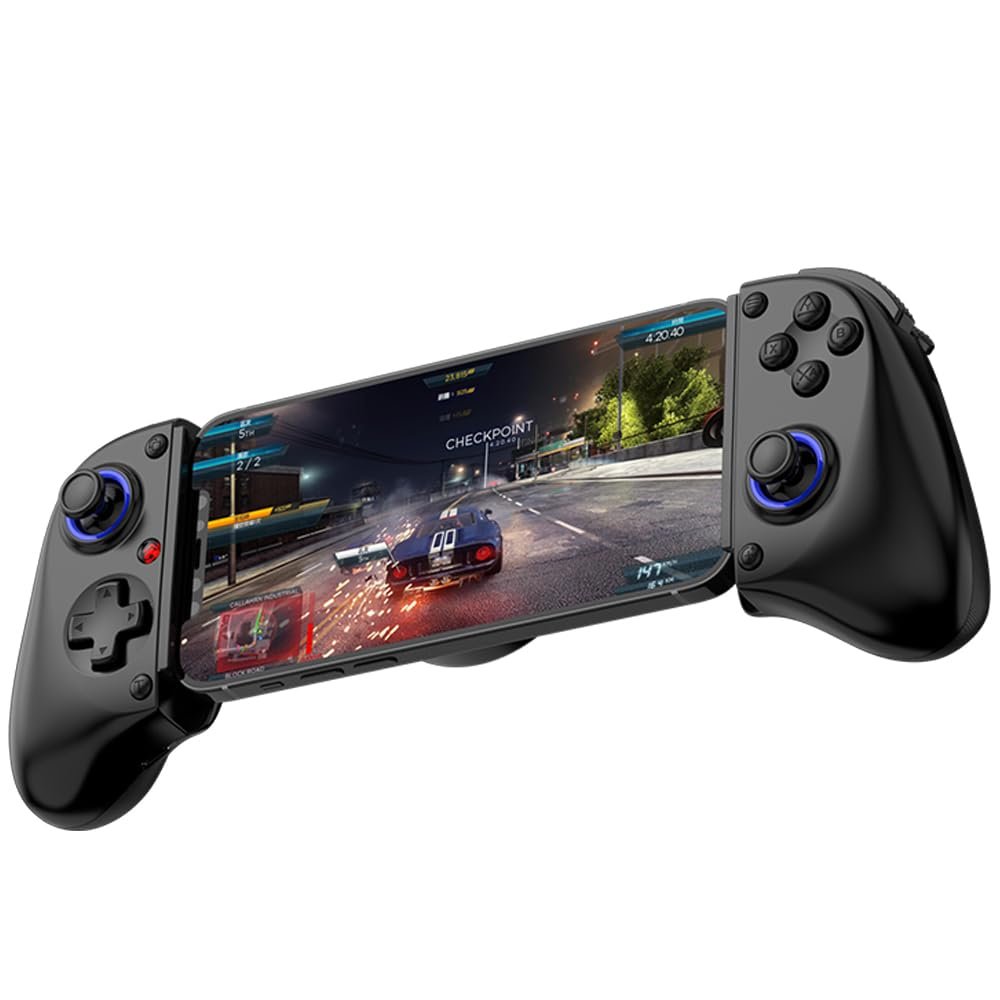
The controller is built as a telescopic grip, meaning it stretches to hold a device between its two halves. According to the product information, the scalable design supports tablets up to 11 inches, including the 11-inch iPad Pro (M5), 11-inch iPad Air (M3), iPad (A16), iPad mini (A17 Pro), 11-inch iPad Pro (M4), and earlier 11-inch iPad Pro generations, along with tablets from Samsung, Lenovo, Amazon, and Huawei. It is explicitly noted as not compatible with the 12.9-inch iPad Pro or the 13-inch iPad Air, which is an important limitation for owners of those larger models.
The manufacturer describes the shape as ergonomic, stating that the gamepad fits naturally in the hand and is intended to remain comfortable during prolonged use. That is a stated design claim rather than an independently verified one, but it reflects the intent behind the molded grip. The layout includes two joysticks, a set of face buttons, shoulder inputs, and trigger buttons, with programming buttons positioned on the back of the stretched gamepad for macro and turbo adjustments.
Features and Technology
Two hardware features stand out in the specification sheet. The first is the Hall Effect joystick, which the manufacturer describes as high precision with stable performance, faster response speed, and a long service life. Hall Effect technology is typically associated with magnetic sensing rather than physical contact, and the product information frames it in those terms. The second is the linear trigger, which uses 256-level electromagnetic induction to provide what the listing calls full control of gaming force and speed per tap. The trigger is also described as having high fluidity and response speed.
The joysticks are further described as 360-degree rotating analog sticks, paired with trigger buttons that the manufacturer states ensure precise accuracy, comfort, and increased sensitivity. These are stated characteristics rather than measured results, so they should be read as the company’s own description of the hardware.
A turbo function rounds out the feature set. The controller supports adjustable turbo settings, one-click burst fire, and auto infinite shooting, which the listing presents as a hands-free option. Macro programming is available through the rear buttons, allowing players to customize personalized commands. The manufacturer positions these functions as helpful for FPS games specifically, where rapid repeated inputs can matter.
Performance and Everyday Experience
Because the controller relies on Bluetooth and supports several distinct connection modes, the everyday experience depends heavily on which mode you select. Each mode is entered through a specific button combination and is confirmed by a colored indicator light:
- Android ShootingPlus mode: Hold the A button, then press HOME. After about two seconds the controller enters V3 Android mode with a flashing light. Pair with the device named “BSP-D11.” A steady red light confirms success. This mode is intended for Android and HarmonyOS games such as PUBGM and CODM that require mapping.
- Android Standard mode: Hold X, then press HOME. The light flashes rapidly, and pairing again uses “BSP-D11.” A steady orange light confirms success. This mode suits native Android and HarmonyOS games as well as PS4 and PS5 streaming.
- iOS MFi mode: Hold B, then press HOME. After two seconds the controller enters iOS MFi mode with a rapidly flashing light. The Apple device should detect it as “DUALSHOCK4 Wireless Controller.” A steady purple light confirms success. This mode is listed as suitable for native Apple, Android, and HarmonyOS games, plus PS4 and PS5 streaming.
- PC X-input Bluetooth mode: Hold RB, then press HOME. After two seconds the controller enters PC Bluetooth mode. On a PC, add a Bluetooth device and pair with “Xbox Wireless Controller.” A steady cyan light confirms success. This mode covers streaming from Android, iOS, HarmonyOS, Xbox console series, and PC consoles, as well as native mobile games.
- Switch mode: On the Switch console, go to Controllers, then Change Grip/Order. Press L and R on the controller, hold RT, then press HOME. After two seconds it enters Switch pairing mode. A steady green light confirms success. This mode is used for the Switch console.
The variety of modes means the same controller can serve different platforms, but it also means setup is not a single universal process. The manufacturer advises selecting the connection according to the desired game mode and phone model, and referring to the manual or product detail page for instructions. It also notes that if Bluetooth connection issues or mismatches with game operation occur, customer service can be contacted for assistance.
Connectivity and Compatibility
The controller supports iOS, Android, Windows, Switch, PlayStation, and streaming setups. The listed compatible devices include iPhone models from the 9 through 17 series in Plus, Pro, and Pro Max variants, along with Samsung, OPPO, realme, and Xiaomi phones. On the console side, it lists Switch 1, Switch 2, Lite, and OLED, plus PS3 and PS4, PC, and cloud gaming. MacBook is also mentioned as a supported device.
There are clear exclusions worth noting. The controller does not support Apple TV, iPod, Fire TV, or TV boxes. It is also not compatible with the 12.9-inch iPad Pro or the 13-inch iPad Air. Anyone whose main device falls into those categories would need to look elsewhere.
Who Is This Product Best For?
This controller is aimed at players who want physical controls across more than one platform. Because it supports iOS, Android, Windows, Switch, and PlayStation streaming, it could suit someone who plays mobile shooters like PUBGM or CODM on Android and also wants a gamepad for Switch or PC streaming. The telescopic design makes it a natural fit for phone and tablet players who prefer a grip-style controller rather than a separate stand. The turbo and macro functions are likely to appeal to FPS players who want programmable inputs, while the Hall Effect joystick and linear trigger are relevant to anyone who cares about analog precision in racing or shooting games. It is less suited to owners of the largest iPad models, which are explicitly excluded.
Final Verdict
The Bluetooth Mobile Game Controller for Nintendo Switch 2, iOS, Android, and tablets packs a broad feature set into a stretchable grip format. Its Hall Effect joysticks, 256-level linear triggers, turbo function, and macro programming give it more depth than a basic mobile gamepad, and the multi-mode Bluetooth pairing lets it move between phones, tablets, Switch, PC, and PlayStation streaming. The trade-offs are the platform exclusions, particularly the larger iPad models, and a setup process that requires matching the correct mode to the correct device. For players who want one controller to cover several systems and are willing to follow the mode-specific pairing steps, this gamepad offers a practical way to add tactile control to mobile and streaming play.
View on Amazon